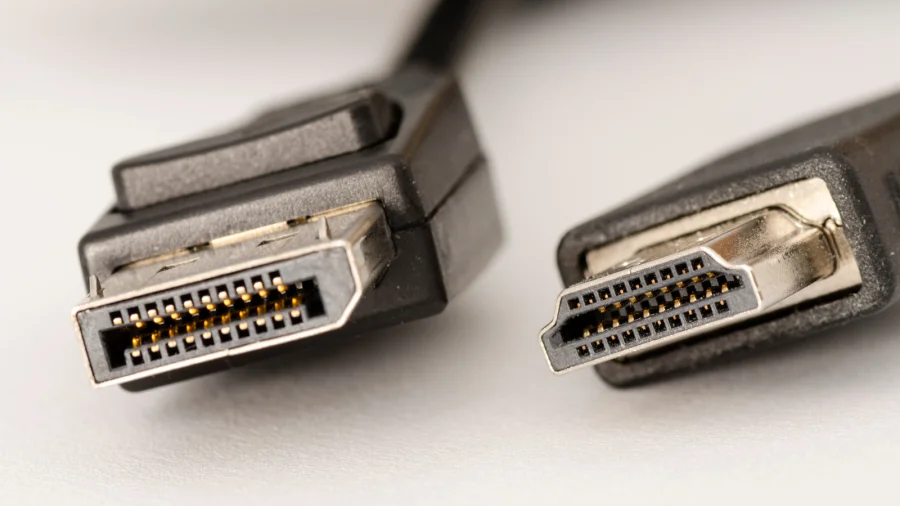

Choosing the right connection for your monitor can be confusing. There are three main options: HDMI, DisplayPort, and USB-C. Each one has its own strengths and is best suited for different tasks. The simple answer is that HDMI excels for media consumption, while PC gamers prefer DisplayPort.
HDMI: Best for Media and Everyday Use
HDMI is the most common connection type. It is found on almost every TV, monitor, and laptop. According to KTC, HDMI is "more convenient when you move between conference rooms, TVs, and shared displays." This makes it a great all-around choice for watching movies, browsing the web, and office work. It can handle common resolutions like 1080p60, 1440p60, and 4K60 without any issues.
DisplayPort: The Gamer's Choice
For PC gamers, DisplayPort is often the better option. It supports higher refresh rates and more bandwidth than standard HDMI. According to a post on Facebook, "If you're into high-end games DisplayPort 2.1 let you enjoy the fastest refresh rates available. You can enjoy 4K 240Hz gaming with DisplayPort." This means smoother gameplay and less screen tearing for competitive gamers.
USB-C: The Modern Office Solution
USB-C is becoming more popular, especially for modern laptops. It can carry video, data, and power through a single cable. For office productivity, USB-C to DisplayPort is a strong choice. According to KTC, "USB-C to DisplayPort is often cleaner for dual-monitor desks and monitors with PC-first features." This makes it ideal for professionals who need a tidy desk setup with multiple screens.
How to Choose the Right Connection
The best connection depends on what you do with your monitor. Here is a simple breakdown:
- For media consumption (movies, TV shows): Choose HDMI. It is widely compatible and works well with TVs and streaming devices.
- For PC gaming: Choose DisplayPort. It offers the highest refresh rates and is the standard for gaming monitors.
- For office work and productivity: Choose USB-C. It simplifies your desk setup and works well with modern laptops.
Our Take: Match the Connection to Your Needs
In our view, there is no single "best" connection. The right choice depends entirely on your use case. HDMI is the most versatile and works for almost everyone. DisplayPort is a must for serious gamers who want the best performance. USB-C is the future for office workers who value simplicity and a clean desk. Before buying a new monitor or cable, think about what you do most. That will tell you which connection is right for you.