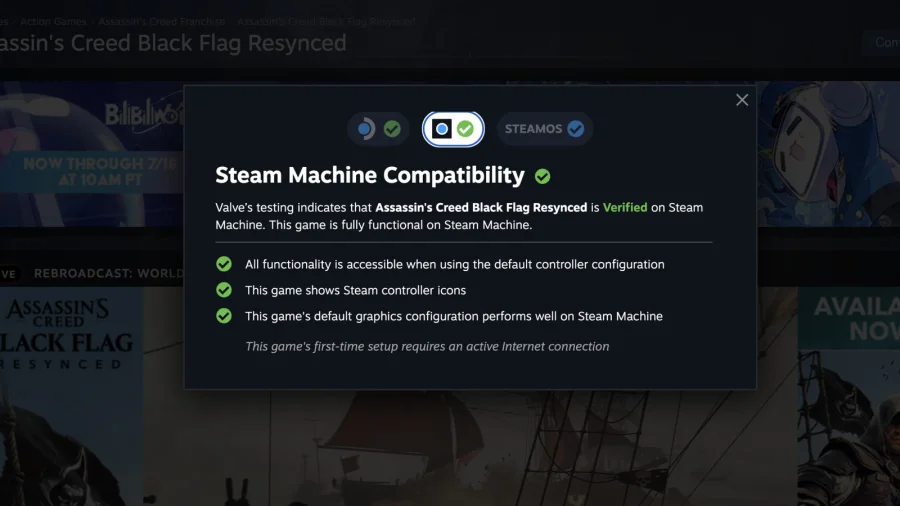

If you own a Steam Machine or are thinking about getting one, there is good news. Steam has made it much easier to find out if a game will run on your device. You just have to know where to look on the Steam page.
Where to Find the Compatibility Rating
The compatibility information is shown directly on the game's store page on Steam. When you browse a game, you will see a clear rating that tells you if it works well with the Steam Machine. This saves you from guessing or searching through forums for answers.
According to Steam's official verification page, when you visit your library on a SteamOS device, you will automatically see the compatibility rating of each game. This rating shows you the kind of experience you can expect when playing. You can also filter your library by compatibility rating to find games that work best for you.
How the System Works
The compatibility system uses a simple rating system. Games are tested and given a label that tells you if they are fully compatible, playable, or not supported. This makes it easy to decide which games to buy or install.
Steam has been working on this system for a while, and it is now available for Steam Machine users. The goal is to remove the confusion around which games work on SteamOS. Instead of relying on community reports or trial and error, you get official information from Steam itself.
Why This Matters for Steam Machine Owners
For people who use a Steam Machine, knowing game compatibility is important. Not all games on Steam are built to run on Linux-based systems like SteamOS. This feature helps you avoid buying a game that will not run properly on your device.
The compatibility rating is shown in a few places. You can see it on the game's store page before you buy. You can also check it in your library after you own the game. This gives you multiple ways to confirm compatibility.
Our Take: A Simple Fix for a Big Problem
This is a straightforward improvement that should have been there from the start. For years, Steam Machine owners had to dig through forums or use third-party tools to check if a game would work. Now, the information is right there on the page. It is not a flashy feature, but it solves a real problem. If you use a Steam Machine, this change makes your life easier. You can now shop for games with confidence, knowing exactly what will run on your device.