

Summary
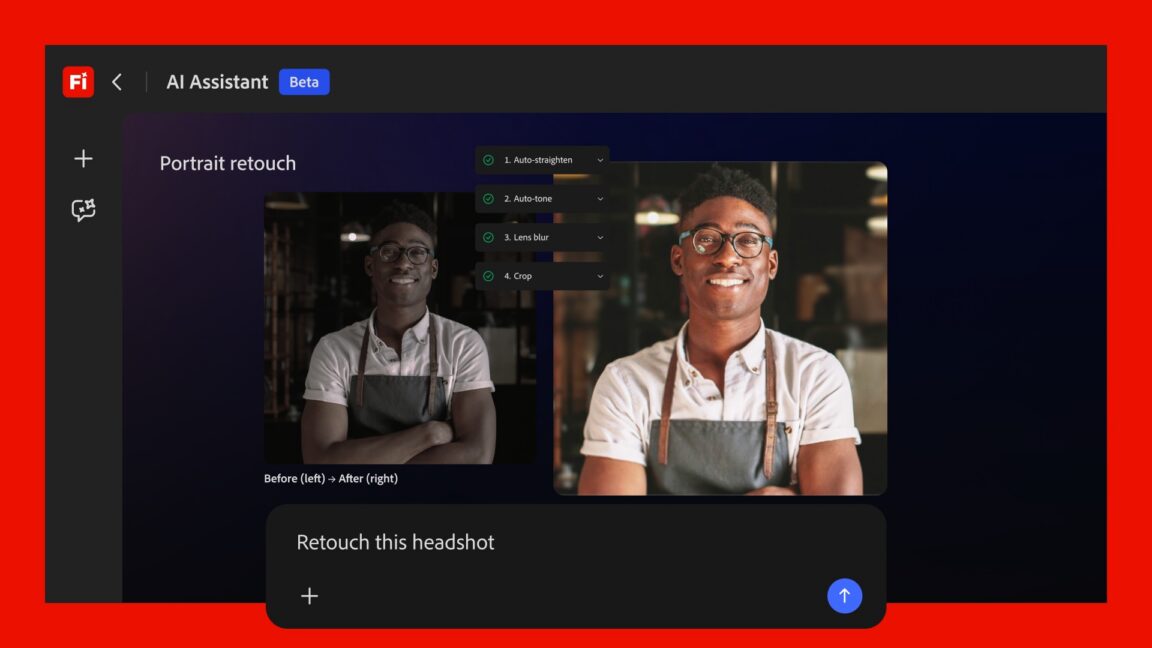
Adobe has introduced a new tool called the Firefly AI Assistant to help users manage their creative work more easily. This new chat-based interface acts like a digital helper that can handle tasks across several different programs, such as Photoshop, Illustrator, and Premiere. Instead of working in just one app at a time, the assistant can coordinate projects that require multiple tools. This move aims to help professional creators save time on repetitive work while making it easier for beginners to turn their ideas into finished projects.
Main Impact
The launch of the Firefly AI Assistant marks a major change in how people interact with creative software. For a long time, users had to spend years learning the specific buttons and menus of each Adobe program. Now, the company is moving toward a system where you can simply describe what you want to achieve. This shift reduces the technical knowledge needed to produce high-quality art, videos, and designs. By acting as a bridge between different applications, the assistant removes the friction of moving files and settings from one place to another, which has traditionally been a slow and manual process.
Key Details
What Happened
Adobe has been adding artificial intelligence to its software for a while, but this new update is different. Previously, AI tools were locked inside specific apps. For example, you could use AI to expand a background in Photoshop or edit audio in Premiere. The Firefly AI Assistant is a central hub that sits above these individual apps. It can talk to the user, understand a complex request, and then go into the various programs to perform the necessary steps. It does not just give advice; it actually performs the actions and checks in with the user to make sure the work is going in the right direction.
Important Numbers and Facts
The assistant is built on Adobe’s Firefly technology, which is designed to be safe for commercial use. It is being integrated into the Creative Cloud suite, which millions of people use globally. One of the main goals of this release is to close the "skills gap." Adobe noted that as their tools became more powerful over the years, they also became harder to learn. This new interface is designed to fix that by allowing users to use natural language instead of complex keyboard shortcuts. Users can also stop the assistant at any point during a task to provide new instructions or fix a mistake, making the process feel like a conversation with a human assistant.
Background and Context
To understand why this is a big deal, it helps to look at other parts of the tech world. In the software development industry, tools like "Claude Code" have started helping programmers write and fix code by simply chatting with an AI. Adobe is now bringing that same idea to the world of design and video. In the past, if you wanted to create a social media campaign, you might have to edit a photo in Photoshop, create a logo in Illustrator, and then put them together in a video using Premiere. Each step required different skills. Adobe wants to simplify this so that the AI handles the technical "heavy lifting," allowing the human to focus on the creative vision.
Public or Industry Reaction
The creative community has mixed feelings about these types of updates. Professional designers often appreciate tools that take away "grunt work," such as resizing images for twenty different social media platforms or organizing layers in a file. These tasks are boring and take up a lot of time. However, there is also a conversation about what this means for entry-level jobs. If an AI can do the work of a junior designer or an assistant, some worry that it might become harder for new people to start their careers. On the other hand, small business owners and hobbyists are excited because they can now create professional-looking content without having to hire an expensive agency or spend months learning difficult software.
What This Means Going Forward
Looking ahead, we can expect Adobe to make this assistant even more proactive. Instead of waiting for a command, the AI might start suggesting better ways to finish a project or pointing out errors before they happen. This could lead to a future where "using software" feels less like operating a machine and more like managing a team. For the industry, this means that the most important skill will no longer be knowing which button to click, but rather knowing how to give clear instructions and have a good eye for design. Adobe will likely continue to update its AI models to ensure they stay competitive as other companies launch similar chat-based creative tools.
Final Take
Adobe is changing the way we think about creativity by putting an AI manager at the center of its software suite. By allowing a single chat interface to control multiple powerful apps, they are making professional tools accessible to everyone. While this technology changes the role of the traditional creator, it also opens up new possibilities for people who have great ideas but lacked the technical skills to bring them to life. The focus is clearly shifting from manual labor to creative direction.
Frequently Asked Questions
What is the Firefly AI Assistant?
It is a chat-based tool from Adobe that can perform tasks across different Creative Cloud apps like Photoshop and Premiere by following simple text instructions.
Do I still need to learn how to use Photoshop?
While the assistant handles many tasks, knowing the basics of the software will still help you fine-tune the results and give better instructions to the AI.
Is this tool available for all Adobe apps?
The assistant is designed to work across the major apps in the Creative Cloud suite, focusing on those used for image editing, graphic design, and video production.